Difference between revisions of "MWLLFlowNodes:SetAmbientTemp"
From MechWarrior: Living Legends Wiki
m |
m |
||
| (2 intermediate revisions by the same user not shown) | |||
| Line 1: | Line 1: | ||
| − | { | + | {| class="wikitable" style="border:1px solid #250b2d; text-align:left; width:500px;" cellpadding="1" cellspacing="0" rules="all" align="right" |
| − | + | ! colspan="3" style="background:#2a2a2a; text-align:center; font-size:12pt" | Set Ambient Temp | |
| − | | Name | + | |- |
| − | | | + | | '''Name''' || '''Type''' || '''Description''' |
| − | + | |- | |
| − | + | |AmbientTemperature | |
| − | + | |Float | |
| − | | | + | |Temperature which will be set on unit |
| + | |- | ||
| + | |LocalConductivityFactor | ||
| + | |Float | ||
| + | |Speed in which temperature will change (affects weapons cooldown | ||
| + | |- | ||
| + | |IsLiquid | ||
| + | |Bool | ||
| + | |Make this temperature change work only on submerged vehicles if set to true | ||
| + | |- | ||
| + | !colspan="3" style="text-align:center" | [[File:SetAmbientTemp.png]] | ||
| + | |- | ||
| + | |} | ||
| Line 16: | Line 28: | ||
#Set it's height to desired level - for Mechs 20 should work well | #Set it's height to desired level - for Mechs 20 should work well | ||
#Add Entity -> Triggers -> AreaTrigger | #Add Entity -> Triggers -> AreaTrigger | ||
| − | #Select AreaShape, below Target box click "Pick", click on the AreaTrigger <br>[[File: | + | #Select AreaShape, below Target box click "Pick", click on the AreaTrigger <br>[[File:SetAmbientTemp_Example1a.png|300px]] |
#Select AreaTrigger, click "Create" Flow Graph | #Select AreaTrigger, click "Create" Flow Graph | ||
| − | #Create flowgraph as follows:<br>[[File: | + | #Create flowgraph as follows:<br>[[File:SetAmbientTemp_Example1b.png]]<br>Note: Remember to have flowgraph ''MultiPlayer Options'' as ''ClientOnly'' (set by default) - otherwise it won't work. |
{{Navbox FlowNodes}} | {{Navbox FlowNodes}} | ||
[[Category:FlowNodes]] | [[Category:FlowNodes]] | ||
Latest revision as of 04:08, 15 August 2017
| Set Ambient Temp | ||
|---|---|---|
| Name | Type | Description |
| AmbientTemperature | Float | Temperature which will be set on unit |
| LocalConductivityFactor | Float | Speed in which temperature will change (affects weapons cooldown |
| IsLiquid | Bool | Make this temperature change work only on submerged vehicles if set to true |

| ||
SetAmbientTemp is the MWLL Flowgraph Node setting temperature (it won't be visible as "ext" (external) in HUD, only cause Core temperature to raise)
Examples
- Add Area -> Shape
- Set it's height to desired level - for Mechs 20 should work well
- Add Entity -> Triggers -> AreaTrigger
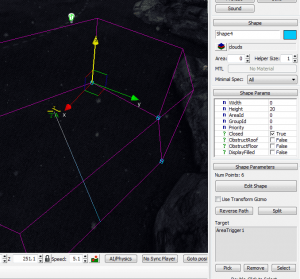
- Select AreaShape, below Target box click "Pick", click on the AreaTrigger
- Select AreaTrigger, click "Create" Flow Graph
- Create flowgraph as follows:
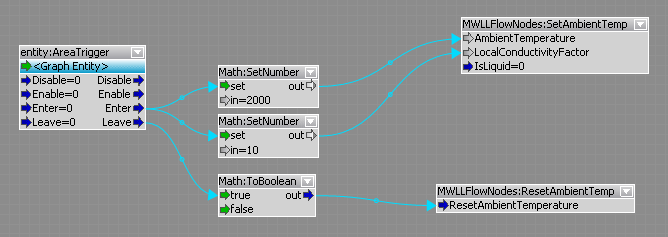
Note: Remember to have flowgraph MultiPlayer Options as ClientOnly (set by default) - otherwise it won't work.


